


Hardware Key Logging Part 3:
A Review Of The KeyLlama USB and PS/2 Keyloggers
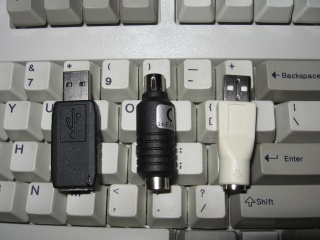 |
| From left to right: The KeyLlama USB 2GB, the PS/2 KeyLlama 2MB and the PS/2 to USB quick downloader. |
Awhile back I wrote two articles on the current generation of USB keyloggers:
Hardware Key Logging Part 2:A Review Of Products From KeeLog and KeyGhost
I highly recommend you read both of these pages before continuing since I will assume you understand the basics of how hardware keyloggers work in this article.
I was recently contacted by the owner of KeyLlama.com, who has assumed responsibility for the Keelog products in North America (now re-branded as KeyLlama). They also sell the KeyKatcher and KeyCarbon brands. One advantage of this import arrangement is if you buy from KeyLlama you won't have to send your product to Poland to handle warranty claims. Doug Kerfoot of KeyLlama was kind enough to provide me with two product samples for evaluation, a 2MB PS/2 KeyLlama and a 2GB USB KeyLlama.
2MB PS/2 KeyLlama
In my last set of reviews I only covered USB keyloggers since I saw them as the wave of the future. However, PS/2 is still very common so I'm glad I got a chance to review this product. 2MB may not seem like a lot, but when it comes to logging just key presses that's quite a bit of data. There are two ways you can retrieve data from the 2MB PS/2 KeyLlama, from a menu system typed into a text editor like notepad, or with the USB quick download adapter (my preferred method).
To bring up the typed menu system first go into a text editor and hold down the keys K, B and D at the same time. Then you will be presented with the menu system. I could put in half a dozen screen shots, but this video would be more clear:
http://www.irongeek.com/i.php?page=videos/keyllama-ps2-keylogger
To retrieve the key log using the quick USB downloader simply insert the PS/2 KeyLlama into the USB adapter, then plug the adapter into any available USB port. At this point the 2MB of flash memory on the KeyLlama can be accessed like a thumbdrive, just copy off log.txt and do with it as you wish. You will also notice a config file, and a log.exe binary. I'll explain more about the log.exe program in a later section.
Stealth
As a PS/2 keylogger, if there is a way to detect it beyond physical inspection I've not found it.
2GB USB KeyLlama
The 2GB
USB KeyLlama is an upgraded and re-branded version of the KeeLogger Flash USB
2MB that I have tested previously. As such, much of this review is the same as
the KeeLog review with a few noted differences. No turbo downloader or automated
typing of logs into a text editor are required. Instead, when you hold down
three selectable keys at the same time (K, B and S by default) the KeyLlama will
switch into thumb drive mode, and you can just copy off and open the LOG.TXT
file in any text editor to see what key strokes are logged (or use the log.exe
app I'll talk about later). You can set options for keylogging by editing
CONFIG.TXT. My config file looks like the following:
Password=KBS
LogSpecialKeys=Full
DisableLogging=No
The "LogSpecialKeys=Full" line is especially important to set if you want the KeyLlama to log ALT+Numpad key presses. I think the idea of turning the keylogger into a flash disk to recover the logs is pretty nifty. The down side is that you can't type anything on the keyboard it's hooked to while it's acting as a UFD. To make it start logging again you have to unplug and re-plug it in, or use the "safely remove hardware" option to disconnect the UFD to get it back into logging mode (unless you use the log.exe app, which trust me I'll get to soon).
Another weird issue I had with the KeyLlama was that on some computers (a Dell gx280 for example) my sk-8125 keyboard would log garbage instead of the real keystrokes. I'd type:
This is a test of typing with a Dell sk-8125 into a Dell 280.
and it would log:
[Pwr][Sh]Thi a tes ypig wi [Sh]Dllk-8125 n a [Sh]Del80.
like it was missing characters. I had much this same problem with the old KeeLogger so this was to be expected. It seems that the KeyLlama needs time to enumerate all of the USB devices on the system, so if the device fails to log all keys at first give it some time. By unplugging all USB devices and plugging them back in I was able to solve the problem on one machine. There are also other CONFIG.TXT tweaks listed in the manual that could solve the problem. Doug at KeyLlama was kind enough to to buy the exact same combo that gave me the issue (a Dell gx280 and a sk-8125), but was not able to reproduce the problem, it worked fine. It should also be stated that the exact same keyboard on another computer, or the same computer with a different keyboard, worked just fine for me. I only had the problem with my Dell gx280 and sk-8125. In the unlikely event that someone had an irresolvable issue like mine, Doug said they would absolutely refund their purchase.
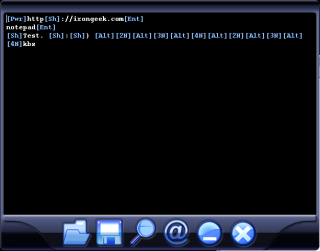 Now, as to the aforementioned Log.exe application that comes on the KeyLlama's
flash space. Log.exe does syntax highlighting of the log file, and also allows
you to easily search the log file for email addresses, URLs and other tidbits.
The magnifying glass icon allows you to search the log, and the @ symbol
automatically parses out URLs, E-mail addresses and the like. The best thing
about Log.exe is that when you close it the KeyLlama automatically goes back
into log mode so you don't have to reach around the back of the PC to unplug and
replug the keylogger. This may seem trivial, but it's a nice feature if you have
to work with it a lot.
Now, as to the aforementioned Log.exe application that comes on the KeyLlama's
flash space. Log.exe does syntax highlighting of the log file, and also allows
you to easily search the log file for email addresses, URLs and other tidbits.
The magnifying glass icon allows you to search the log, and the @ symbol
automatically parses out URLs, E-mail addresses and the like. The best thing
about Log.exe is that when you close it the KeyLlama automatically goes back
into log mode so you don't have to reach around the back of the PC to unplug and
replug the keylogger. This may seem trivial, but it's a nice feature if you have
to work with it a lot.
The KeyLlama USB is also very stealthy. While it's inline you only see the keyboard's device ID in the device manager; there's no hub-like devices to give away its presence. The inline thumbdrive test seemed to work fine, I even tested it in Linux using USBView and it reported the UFD as running at full USB 2.0 speed. This is an improvement over the KeeLogger. For more information on how the KeyLlama works check out this video:
http://www.irongeek.com/i.php?page=videos/keyllama-USB-keylogger
To summarize, I'm very happy with the performance of both the PS/2 and USB versions of the KeyLlama. I've not found a way to detect either via software as of yet. Perhaps if someone watched their logs for the insertion and removal of USB devices (the keyboard being unplugged and replugged for example) they might notice something, but if they are so paranoid that they would notice that they would probably find the KeyLlama via physical inspection first. In the near future I plan to see if I can detect the deceives programmatically via a voltage drop on the USB bus.
Links:
Hardware Key Logging Part 2:A Review Of Products From KeeLog and KeyGhost
 Printable version of this article