


Hardware Key Logging Part 2:
A Review Of Products From KeeLog and KeyGhost
Welcome to Part Two of my article on USB keyloggers. For those that have not read part one, check it out at:
http://www.irongeek.com/i.php?page=security/usb-hardware-keyloggers-1-keycarbon
It covers many of the whys, whens and wheres of hardware keyloggers. This time around I have three new (to me at least) keyloggers to cover:
 |
| From left to right: KeyCarbon, KeyGhost Plug, KeyGhost Cable, KeeLog and finally a broken KeyGhost Cable with the IC chips numbers strangely sanded off |
1. KeyGhost USB/HUB Keylogger - TimeDate 2 MB (Cable Style)
$349
http://www.keyghost.com/USB-Keylogger.htm
2. KeyGhost USB 512KB (Plug Style)
$249
http://www.keyghost.com/USB-Keylogger.htm
3. KeeLogger Flash USB 2MB
$89.99
http://www.keelog.com/usb_hardware_keylogger.html
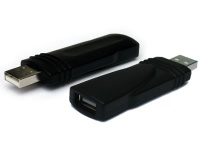
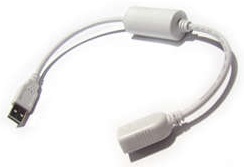
You will notice in the picture at right that the KeeLog product is the smallest of the three, followed by the plug style KeyGhost and then the cable style KeyGhost. I tossed the KeyCarbon from my previous article in to help you with the size comparison. I'm not sure why KeyGhost chose to make their Time/Date stamping cable as big as it is. One failed on me during testing so I took it apart to see if I could reset it somehow. The core electronics look like they could easily be put into a smaller package. Maybe in later releases they will shrink down the housing. All of these keyloggers have their tradeoffs which I will cover shortly.
Keyloggers In Use
As stated in the first article, installation of these sorts of devices is simple. Just plug the keylogger inline with the keyboard. From there it should start logging key strokes. Retrieval and configuration, on the other hand, varies somewhat from model to model.
KeyGhost
I'll cover the two products from KeyGhost first. Both the cable and the plugs style work in much the same way as the KeyCarbon from my pervious article: just open a text editor and type in a certain changeable key sequence. They keylogger will then type out a menu for you to choose from. This menu varies somewhat between the two KeyGhost products, but the core functionality is the same.
| Cable Style | Plug Style |
| KeyGhost USB/HUB Keylogger - TimeDate 2 MB. Current KeyGhost time is 2007-04-16 12:16 WARNING: KeyGhost Stealth setting is set to Low IMPORTANT: Press 8 to increase stealth before deployment. Press Escape at any time to go back a step. Main Menu. 1. Download Keystroke Log 2. Download New Data Only 3. Download Page(s) [Current log is 9 pages long] 4. Time/Search Constraints [] 5. Erase log 6. Password Change 7. Change Ghost Speed [Current speed = 3] 8. Stealth settings 9. Time settings Press Space to Exit Select> |
(c) Copyright 2005 by KeyGhost Ltd. All rights
reserved. Version: 2006-01-05 KeyGhost USB 512KB memory (128-bit encrypted) MAIN MENU (Memory 0% full, ~28 keys) 1) Download keyboard log (detailed listing) 2) download Text log (show text only) 3) Erase log 4) change Password 5) disable Fast mode 6) Advanced download 7) Quit and return to operation |
Choose the option you want by
typing its number in the menu. The number one choice in both cases is to dump
the keystroke log. Unfortunately, at this time KeyGhost does not have a high
speed keylog downloader option for their USB line of keyloggers (they do
for their PS2 models). You can change the KeyGhosts typing speed if you wish,
but if you set it too high your menu options won't be readable. Setting the
speed to 3 worked well for me. You will notice that the more expensive cable
style TimeDate keylogger has extra options. These extra options let you set
things like the time, date and stealth modes. A representative from KeyGhost told me that one of their main engineering focus points was stealth,
which I have to say they did a very good job of in the case of their cable style
product (if you disregard its physical size). I plan to cover more of the details of keylogger stealth later in
this article, but for now I want to cover the possible stealth settings that
the KeyGhost TimeDate cable gives you:
Low - HUB and Second Keyboard visible (Faster menu access). In my tests both the
real and virtual keyboards show, as well as a USB Hub. The identifying
information is idVendor: 0x0451 (Texas Instruments) and idProduct: 0x2036. In
low stealth mode the KeyGhost cable acts very much like the KeyCarbon, and its
hardware profile could be detectable.
Medium - USB HUB only (Ghost keyboard only enumerates when required). Only the real keyboard shows up in the device manager until the KeyGhost's virtual keyboard is needed for setting options and typing back keystrokes, but the hub is always present.
High - AUTO SENSING - (USB Hub and Ghost keyboard only enumerate when required). In this mode the KeyGhost cable is pretty much invisible.
The plug style KeyGhost is also pretty stealthy as you will see shortly, but pales next to the cable. There are no configurable stealth options with the plug. The logs from the two KeyGhost products look something like the following (Note - I backspaced over my typing after I was done):
| Typed Text | Cable Style | Plug Style |
| Begin test Test alt+numpad Ωδ End test |
<PWR><PWR><start_session> <2007-04-21 15:11> Begin test Test alt+numpad <altl>234<altl>235 End test<bks><end_session> <2007-04-21 15:12> <start_session> <2007-04-21 15:12> ED<win>\gho=<win>=l<f4>og<PWR><PWR><PWR><PWR><start_session> <2007-04-21 15:20> |
-- log begins -- <suspend> <power> <enum> <Lights: N> Begin test<Enter> Test alt+numpad <AltL+><Numpad 2><AltL+><Numpad 3><AltL+><Numpad 4><AltL+><Numpad 2><AltL+><Numpad 3><AltL+><Numpad 5><Enter> End te<?><?><recall> -- log ends -- |
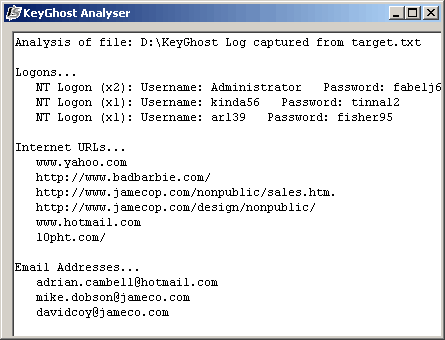 As you can see, at least the KeyGhost products log something when you use ALT+Numpad
to type extended characters, even if you have to do some interpretation
yourself. Speaking of interpretation, check out KeyGhost's
Log Analyzer from the following URL:
As you can see, at least the KeyGhost products log something when you use ALT+Numpad
to type extended characters, even if you have to do some interpretation
yourself. Speaking of interpretation, check out KeyGhost's
Log Analyzer from the following URL:
http://www.keyghost.com/download/index.htm
The log analyzer takes some of the work out of parsing the key stroke logs for meaningful information. The analyzer tries to pluck out useful data like usernames, passwords, email addresses and URLs from the log. It's not perfect, so you may still want to look over the raw text yourself . Still, it's a useful addition.
KeeLog
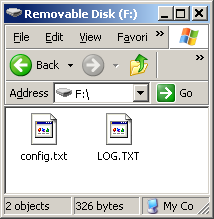 The other brand of USB keylogger I
received was from KeeLog. The KeeLogger Flash USB 2MB works a little
differently than all of the other keyloggers I've tested. No turbo downloader or
automated typing of logs into a text editor are required. Instead, when you hold
down three selectable keys at the same time (k, b and s by default) the KeeLog will
switch into thumbdrive mode, and you can just copy off and open the LOG.TXT
file in any text editor to see what key strokes are logged. You can set options
for keylogging by editing CONFIG.TXT. My config file looks like the following:
The other brand of USB keylogger I
received was from KeeLog. The KeeLogger Flash USB 2MB works a little
differently than all of the other keyloggers I've tested. No turbo downloader or
automated typing of logs into a text editor are required. Instead, when you hold
down three selectable keys at the same time (k, b and s by default) the KeeLog will
switch into thumbdrive mode, and you can just copy off and open the LOG.TXT
file in any text editor to see what key strokes are logged. You can set options
for keylogging by editing CONFIG.TXT. My config file looks like the following:
Password=KBS
LogSpecialKeys=Full
DisableLogging=No
If you need a different keyboard layout to support another language you can download a LAYOUT.TXT file from:
http://www.keelog.com/download.html#layout
and put it on the root of the thumbdrive. I think the idea of turning the keylogger into a flash disk to recover the logs is pretty nifty. The down side
is that you can't type anything on the keyboard it's hooked to while it's acting
as a UFD. To make it start logging again you have to unplug and re-plug it in, or use the
"safely remove hardware" option to disconnect the UFD to get it back into logging mode.
My solution is to just use two keyboards while retrieving the logs.
Another weird issue I had with the KeeLogger was that on some computers (Dell gx260/gx280) my Dell sk-8135 and sk-8125 keyboards would log garbage instead of the real keystrokes. I'd type:
"I seem to be getting odd results with the KeeLog"
and it would log:
[Sh]Isoti d rlts th teeeog
like it was missing characters. However the same keyboard would work fine with the KeeLogger on a different make of computer, and the computers that were giving the keylogger hell with the sk-8135 and sk-8125 would work fine if I used a different keyboard inline (My IBM Model M using a PS2 to USB and my Gandtec FLY-2000 both worked great). Be warned that that sometimes the KeeLog fails with different combinations of computer and keyboard. I've been talking to KeyLog and they are working on the problem. Maybe it will be fixed in the near future.
The logs from the KeeLogger product look something like the following (Note - I backspaced over my typing after I was done):
| Typed Text | KeeLog USB |
| Begin test Test alt+numpadΩδ End test |
[Sh]Begin test[Ent] [Sh]Test alt[Sh]+numpad[Alt][2N][Alt][3N][Alt][4N][Alt][2N][Alt][3N][Alt][5N][Ent] [Sh]End test[Bck][Bck][Bck][Bck][Bck][Bck][Bck][Bck][Bck][Bck][Bck][Bck][Bck][Bck][Bck][Bck][Bck][Bck][Bck] |
It would be nice if KeeLog had some software for parsing out useful information from the logs like KeyGhost's Log Analyzer, but you could likely roll your own using Perl or Python. KeeLog seems to have more of the old school hacker mindset, with products on their website designed so you can roll your own home built keyloggers if you wish. They also offer the best prices of any hardware keylogger company I've found.
Stealth and Detectability
In my review of the KeyCarbon product I tested how detectable it was, and I plan to do the same for these keyloggers. The key tool I'm using for this is USBView under Linux. USBView lets you see what sort of USB devices are plugged in, as well as important information about the device like its vendor id, product id and connection speed. For convenience I've include a screen shot of USBView next to each of the keyloggers. Also, in the summaries I'll refer to an "inline thumbdrive". This means I tested the keylogger by inserting a thumbdrive directly inline between it and the host's USB port to test out connection speed.
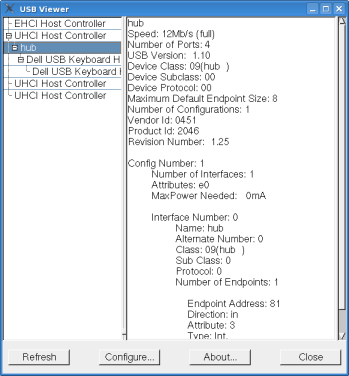 |
KeyCarbon As stated in the previous article, the KeyCarbon shows up as a generic Texas instrument hub device with a vendor id of 0451 and a product id of 2046. While this is pretty nondescript, it does open up the possibility of detection. Also, since the KeyCarbon USB Mini acts as a 1.1 hub it is possible that it may be discovered if someone plugs a USB 2.0 device inline with it. Lets say for example the keyboard is plugged into a USB 2.0 hub, and the USB 2.0 hub into the KeyCarbon. If the user then plugs a USB 2.0 flash drive into the hub they may receive a warning message telling them that their thumb drive can perform at a higher speed if they use a different port. This could lead to further investigation and the discovery of the keylogging device.  USBView reports an
inline thumbdrive as having a connection speed of 12Mbs. USBView reports an
inline thumbdrive as having a connection speed of 12Mbs.
|
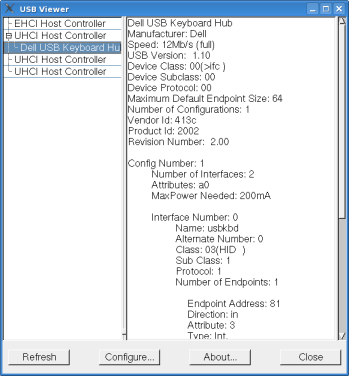 |
KeyGhost Plug The KeyGhost plug does not show up as a hub, and if you look at USBView it appears that the keyboard is plugged directly into one of the computer's USB ports. One down side is that some devices inline with it other than a keyboard or mouse may not work. I tested the KeyGhost plug style by inserting an inline thumbdrive, and inserting the same thumbdrive into the keyoard's onboard hub. In both cases the thumbdrive would not operate. I tried to get a speed reading in USBView under Linux, but it never saw the thumbdrive as existing. A mouse plugged into the keyboard's hub worked fine. As long as the target is not using a hub this won't matter, but since some keyboards have built in hubs that folks use to plug in other devices you should be aware of this limitation.
|
 |
KeyGhost Cable Now the KeyGhost cable seems to be the creme-de-la-creme of hardware stealth, if only it wasn't in that big white housing that's so glaringly obvious. The only time it shows up as a hub device is when you are retrieving the logs. Also, it's the only one of the USB hardware keyloggers that I've tested that is USB 2.0 compliant and lets you plug non keyboard devices inline with it that operate at full speed. USBView under Linux states an inline thumbdrive's connection speed as 480Mbs, but Windows XP sometimes gives a warning indicating it is connecting at less than USB 2.0 speeds. When I tested in Linux and Vista, a flash drive seemed to operate at USB 2.0 speeds.
|
 |
KeeLog Keelog is also very stealthy. While it's inline you only see the keyboard in the device manager; there's no hub-like devices to give its presence away. The inline thumbdrive test seemed to work fine in XP, but the thumbdrive would not show up in Linux and it's reported as not being USB 2.0 in Vista. I never got a warning in XP about it connecting at a lower speed, but that could be a fluke. Since I could never get the inline thumbdrive to work in Linux I could not get a speed reading from USBView. A thumbdrive plugged into the sk-8125's onboard hub worked fine, albeit at the sk-8125 USB1.1 speeds.
|

Summary
Of the four USB hardware keyloggers I've tested, my first choice would be the KeeLogger because of price ($89.99) , fair stealth and a fast way of extracting the logs. Too bad the KeeLog seems to be flaky with some keyboard/computer combinations, hopefully there will be a new firmware release to fix these issues. If you need absolute stealth (software wise) and time/date logging go with the KeyGhost cable, but just keep in mind that it's price puts it out of the hands of most folks. If KeyGhost would just take the electronics from their cable version and put it in a housing like their plug model's, it would be a real winner.
I hope you have found this review useful. I may cover this topic again in one of my future videos.
Keyloggers – content monitoring exploits
http://skrasavi.ds.uiuc.edu/Presentations/Keyloggers.ppt
Linux USB Projects Vendor and Product ID list
http://www.linux-usb.org/usb.ids
KeyGhost USB/HUB Keylogger
http://www.keyghost.com/USB-Keylogger.htm
KeeLogger Flash USB 2MB
http://www.keelog.com/usb_hardware_keylogger.html
BitForensics' KeyCarbon Site
http://www.keycarbon.com/
USB View for *nix (I found this very useful for this article)
http://www.kroah.com/linux/usb/
USB View for Windows (Same name, but not a port of the Linux app above. It's a
little out of date, but still useful.)
http://www.k0lee.com/dc3000/usbts.htm
KeyMail Software Key logger
http://www.irongeek.com/i.php?page=security/keylogger
 Printable version of this article